📝 24 Feb 2026
In GitHub Actions: This is the typical way that we Label a Pull Request. But it’s potentially dangerous, guess why: .github/workflows/labeler.yml
## When a Pull Request is submitted...
on:
  - pull_request_target
jobs:
  labeler: ...
    steps:
      ## Checkout the repo from the Main Branch
      - uses: actions/checkout@v6

      ## Assign the PR Labels based on the updated Paths
      - uses: actions/labeler@main
        with:
          repo-token:  "${{ secrets.GITHUB_TOKEN }}"

      ## Assign the PR Labels based on the PR Size
      - uses: codelytv/[email protected]
        with:
          GITHUB_TOKEN: ${{ secrets.GITHUB_TOKEN }}
In this article we explain why the workflow above is potentially unsafe, and how we fixed it.
How did we discover this problem?
We were notified about the Unsafe pull_request_target during a Security Scan…
“pull_request_target was found as a workflow trigger … If after after 60 days these problems are not addressed, we will turn off builds”
Bummer we need to pull out pull_request_target real quick… Or Apache NuttX Project dies in 60 days!
How did that unsafe workflow get into NuttX?
One Year Ago: We added PR Labeling to quicken NuttX CI Builds. And the GitHub Workflow above is the recommended way to Label a PR.
Though we missed this ominous warning…
“There exists a potentially dangerous misuse of the pull_request_target workflow trigger that may lead to malicious PR authors (i.e. attackers) being able to obtain repository write permissions or stealing repository secrets.”
“Hence, it is advisable that pull_request_target should only be used in workflows that are carefully designed to avoid executing untrusted code and to also ensure that workflows using pull_request_target limit access to sensitive resources.”
Huh? Let’s break it down…
What could possibly go wrong?
Suppose someday, our devs innocently add some Build Commands into the PR Workflow above…
(Remember: We’re Embedded Devs, not Security Experts!)
## Note: This is Unsafe!
## When a Pull Request is submitted...
on:
  - pull_request_target
jobs:
  labeler: ...
    steps:
      ## Risky: Checkout the repo based on the PR
      - uses: actions/checkout@v6
        with:
          ref: ${{ github.event.pull_request.head.sha }}

      ## STOP: Never do this!!!
      - uses: actions/setup-node@v1
      - run: |
npm run buildYep we have a problem…
actions/checkout will checkout our Complete GitHub Repo, applying the changes proposed in the PR. Which might contain Malicious Code and Scripts…
## Checkout the repo based on the PR...
## Including any Malicious Code inside the PR!
- uses: actions/checkout@v6
  with:
    ref: ${{ github.event.pull_request.head.sha }}
Then this will Execute the Malicious Code inside the PR…
## Run the Malicious Code from the PR. Oops!
- run: |
    npm run build
When we Execute Untrusted Code (from a PR): There shall be terrible consequences…
Remember GitHub Crypto-Mining?
Another problem: Leaking GitHub Tokens. We grant Write Permission to the GitHub Token, because it needs to write the PR Labels into the PR…
## GITHUB_TOKEN has Write Permission
jobs:
  labeler:
    permissions:
      contents:      read
      pull-requests: write
      issues:        write
Which means the Malicious Code could Steal our Permissive GitHub Token. And do all kinds of tampering mischief.
There’s a safer solution…
(TODO: Why does GitHub execute Workflows that are submitted inside a PR? Is this a Security Risk?)
Do we really need the Entire Repo from the PR?
Yeah we should limit our exposure to any Malicious Code embedded in the PR.
This is how we checkout One Single File from our repo: .github/workflows/labeler.yml
## Checkout one file from our trusted source: .github/labeler.yml
## Never checkout and execute any untrusted code from the PR.
name: Checkout labeler config
uses: actions/checkout@de0fac2e4500dabe0009e67214ff5f5447ce83dd  # v6.0.2
with:
  repository:  apache/nuttx
  ref:         master
  path:        labeler
  fetch-depth: 1
  persist-credentials: false
  sparse-checkout:     .github/labeler.yml
  sparse-checkout-cone-mode: false
Config File .github/labeler.yml contains all the settings needed by actions/labeler. Thus we don’t actually need the Entire Repo, when we’re Labeling a PR.
Changed Files in the PR: Should we check them out?
Nope! Internally, actions/labeler calls GitHub API to fetch the Filenames of the Changed Files in the PR: actions/labeler/changedFiles.ts
// To fetch the Filenames of the Changed Files in the PR...
async function getChangedFiles(...): ... {

  // Call the GitHub REST API: pulls.listFiles
  const listFilesOptions = client.rest.pulls.listFiles.endpoint.merge({
    owner, repo, pull_number
  });
  const listFilesResponse = await client.paginate(listFilesOptions);
  ...
}
We’ll call the same GitHub API in a while.
(pr-size-labeler calls GitHub REST inside Docker)
But everyone else is checking out the Entire Repo?
Yeah we’re not sure why other folks are following the same Potentially Unsafe Pattern, checking out the Entire Repo from the PR. We see plenty in GitHub Code Search.
What exactly is the Safer Way to Label PRs in GitHub Actions?
We don’t have any Official GitHub Guidance for Safely Labeling a PR. Let’s do it our way…
We limited our exposure to any Untrusted Code from the PR. What about the Leaky GitHub Tokens?
Indeed we still have a problem. ASF Security Policy says…
“You MUST NOT use pull_request_target as a trigger on ANY action that exports ANY confidential credentials or tokens such as GITHUB_TOKEN or NPM_TOKEN.”
Hmmm we can’t possibly prove that pr-size-labeler (and other GitHub Actions) will never ever leak our GitHub Tokens someday. Let’s solve this…
Change our Workflow Trigger: (Unsafe Trigger) pull_request_target becomes (Safer Trigger) pull_request (explained below)
Switch our GitHub Token: (Unsafe) Read-Write Token becomes (Safer) Read-Only Token. Tampering mischief can’t happen with a Read-Only Token.
Label the PR Ourselves: Without calling another GitHub Action. No more leaky tokens!
Don’t we need a Read-Write Token to Set the PR Label?
Aha we’ll come back to this. First we settle the Read-Only GitHub Token: .github/workflows/labeler.yml
## Changed the trigger from "pull_request_target" to "pull_request"
## GitHub Token becomes Read-Only (previously Read-Write)
name: "Pull Request Labeler"
on:
  - pull_request

## Everything becomes Read-Only (previously Read-Write)
jobs:
  labeler:
    permissions:
      contents:      read
      pull-requests: read
      issues:        read

    runs-on: ubuntu-latest
    steps:
      ## Checkout one file from our trusted source: .github/labeler.yml
      ## Never checkout and execute any untrusted code from the PR.
      - name: Checkout labeler config
        uses: actions/checkout@de0fac2e4500dabe0009e67214ff5f5447ce83dd  # v6.0.2
        with:
          repository:  apache/nuttx
          ref:         master
          path:        labeler
          fetch-depth: 1
          persist-credentials: false
          sparse-checkout:     .github/labeler.yml
          sparse-checkout-cone-mode: false
Writing the PR Label becomes interesting…
Setting the PR Labels: Can we call actions/labeler and pr-size-labeler?
Sorry we can’t! Remember we changed the trigger from (unsafe) pull_request_target to (safer) pull_request?
We just lost Read-Write Permission for the PR (due to Read-Only safety)
Which means actions/labeler and pr-size-labeler won’t work (explained here)
Which is OK: We’re doing the PR Labeling ourselves anyway
Changed Files in the PR: How do we find out what changed?
Inside our Workflow: We call the GitHub API pulls.listFiles. It returns the Filenames of the Changed Files, also the Number of Lines Changed…
{ status: 'added',    filename: 'arch/arm/test.txt',
  additions: 3, deletions: 0,    changes: 3 }
{ status: 'removed',  filename: 'Documentation/legacy_README.md',
  additions: 0, deletions: 2531, changes: 2531 }
{ status: 'modified', filename: 'Documentation/security.rst',
  additions: 1, deletions: 0,    changes: 1 }
This is how we call the GitHub API inside our pull_request workflow: .github/workflows/labeler.yml
## Fetch the updated PR filenames. Compute the Size Label and Arch Labels.
- name: Compute PR labels
  uses: actions/github-script@ed597411d8f924073f98dfc5c65a23a2325f34cd  # v8.0.0
  with:
    github-token: ${{ secrets.GITHUB_TOKEN }}
    script: |
      const owner = context.repo.owner;
      const repo  = context.repo.repo;
      const pull_number = context.issue.number;

      // Fetch the array of updated PR filenames:
      // { status: 'added',    filename: 'arch/arm/test.txt',              additions: 3, deletions: 0,    changes: 3 }
      // { status: 'removed',  filename: 'Documentation/legacy_README.md', additions: 0, deletions: 2531, changes: 2531 }
      // { status: 'modified', filename: 'Documentation/security.rst',     additions: 1, deletions: 0,    changes: 1 }
      const listFilesOptions = github.rest.pulls.listFiles
        .endpoint.merge({ owner, repo, pull_number });
      const listFilesResponse = await github.paginate(listFilesOptions);
We loop through the returned filenames, and total up the Number of Lines Changed: labeler.yml
      // Sum up the number of lines changed
      const sizeFiles = listFilesResponse
        .filter(f => (f.status != 'removed'));  // Ignore deleted files
      var linesChanged = 0;
      for (const file of sizeFiles) {
        linesChanged += file.changes;
      }
      console.log({ linesChanged });

      // Compute the Size Label
      const sizeLabel =
        (linesChanged   <=   10) ? 'Size: XS'
        : (linesChanged <=  100) ? 'Size: S'
        : (linesChanged <=  500) ? 'Size: M'
        : (linesChanged <= 1000) ? 'Size: L'
        : 'Size: XL';
      var prLabels = [ sizeLabel ];
      console.log({ prLabels });
Which becomes the Size Label for the PR, like “Size: XS”.
We also have Arch Labels for the PR, like “Arch: risc-v”. This is how we compute them…
Size Label and Arch Labels are all ready. Now we stash the PR Labels safely…
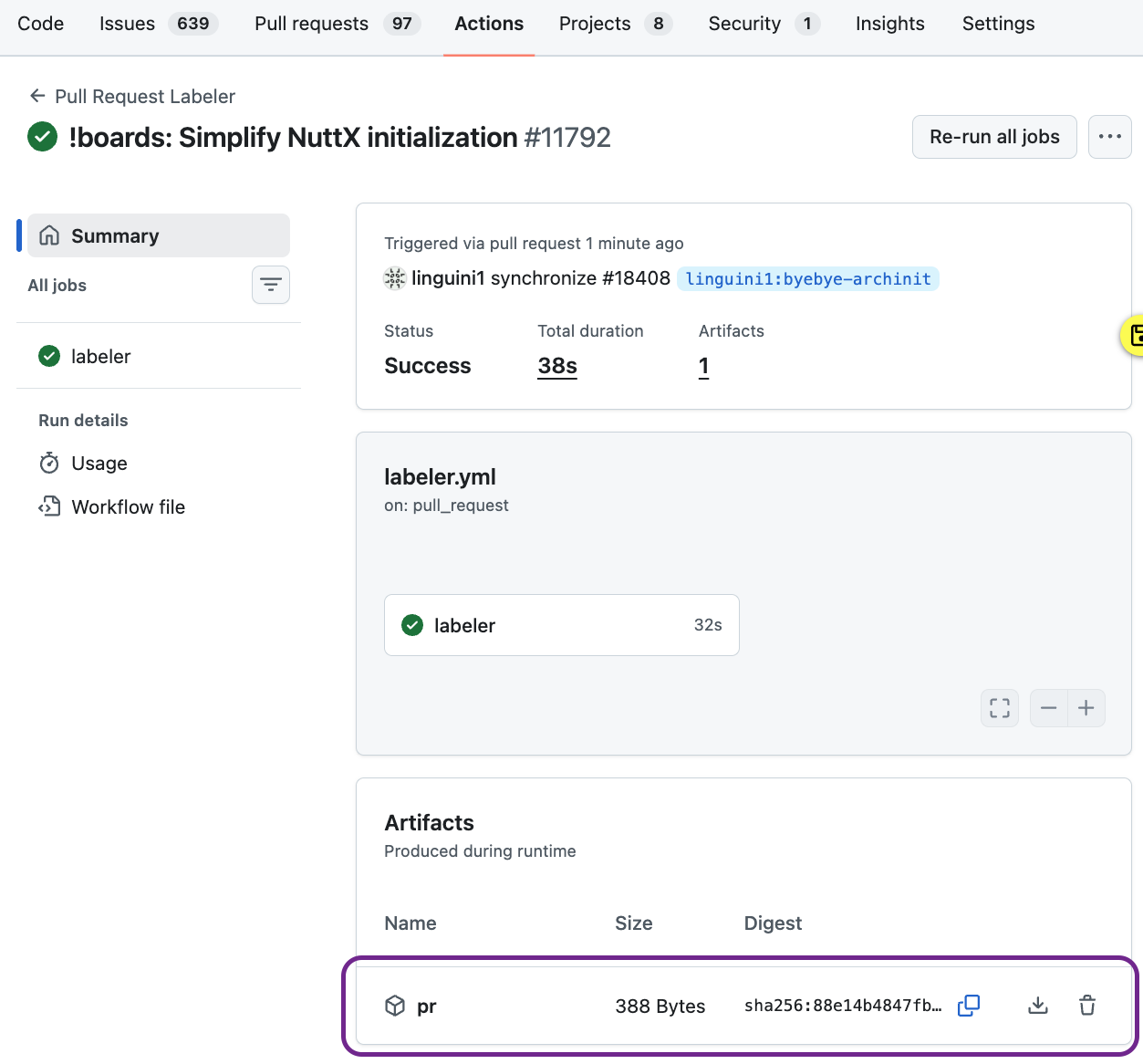
PR Artifact contains PR Number and PR Labels
No Write Permission means we can’t set the PR Labels. How to save the labels?
GitHub offers a safe interim storage for our PR Labels: We save them into a PR Artifact during the Workflow Run. (Pic above)
First we write the PR Number and PR Labels: .github/workflows/labeler.yml
      // Save the PR Number and PR Labels into a PR Artifact
      // e.g. 'Size: XS\nArch: avr\n'
      const dir = 'pr';
      fs.mkdirSync(dir);
      fs.writeFileSync(dir + '/pr-id.txt', pull_number + '\n');
      fs.writeFileSync(dir + '/pr-labels.txt', prLabels.join('\n') + '\n');
Then we upload them as a PR Artifact, that will appear in the Workflow Run: labeler.yml
## Upload the PR Artifact as pr.zip
- name: Upload PR artifact
  uses: actions/upload-artifact@b7c566a772e6b6bfb58ed0dc250532a479d7789f  # v6.0.0
  with:
    name: pr
path: pr/Here comes the Second Part of the PR Workflow…
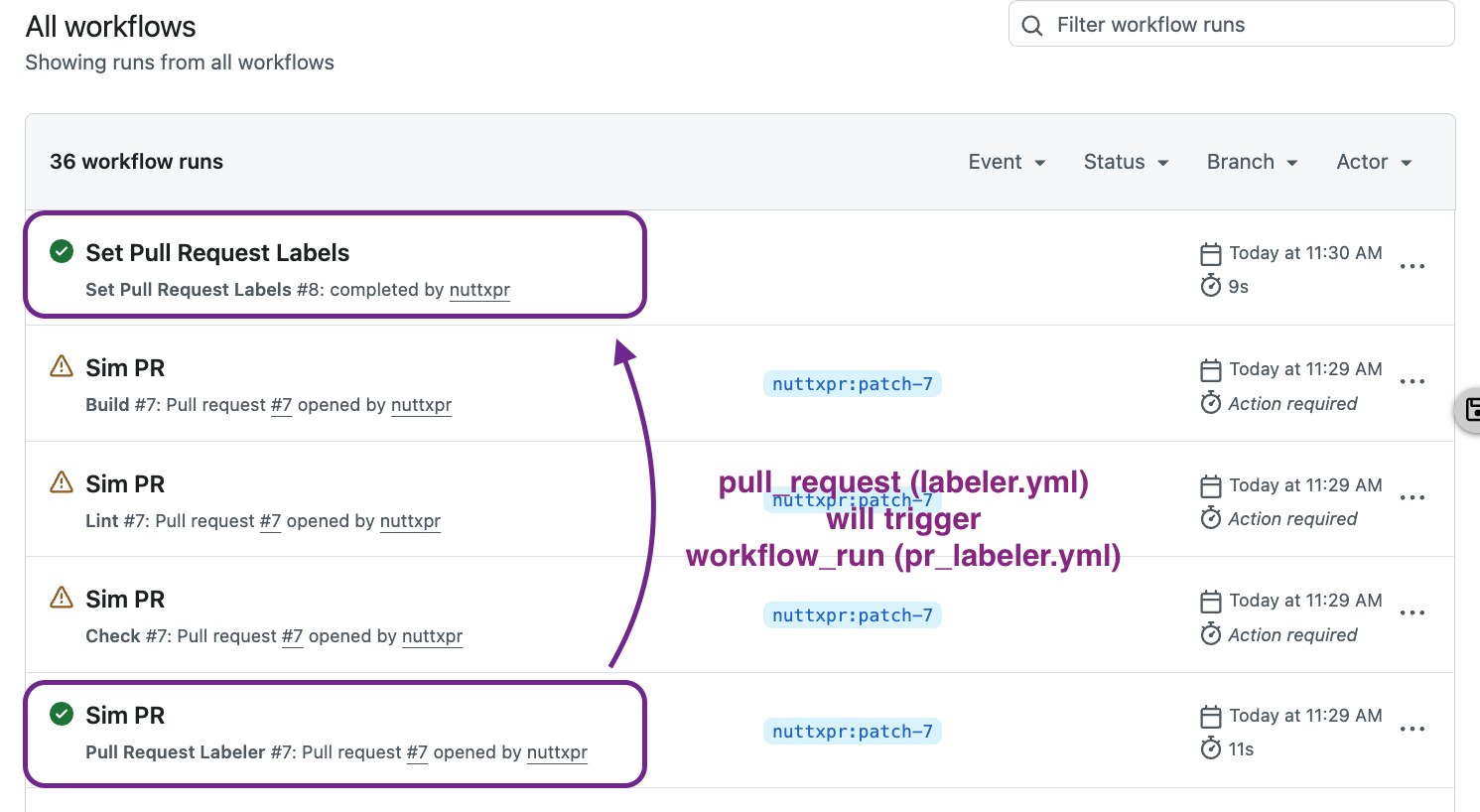
As Recommended by GitHub: We add a new workflow_run workflow that will wait for pull_request workflow to complete. Then it downloads the PR Artifact and sets the PR Labels…
(Read-Only Trigger) pull_request shall (very carefully)
(Read-Write Trigger) workflow_run shall
Here’s how we download the PR Artifact: .github/workflows/pr_labeler.yml
## When the Pull Request Labeler workflow is completed...
name: "Set Pull Request Labels"
on:
  workflow_run:
    workflows: ["Pull Request Labeler"]
    types:
      - completed

## Download the PR Artifact and write the PR Labels.
## Warning: GitHub Token has Write Permission.
## Don't execute any Untrusted Code!
jobs:
  pr_labeler:
    permissions:
      contents:      read
      pull-requests: write
      issues:        write
    runs-on: ubuntu-latest

    ## When the Pull Request Labeler workflow is completed...
    if: >
      github.event.workflow_run.event == 'pull_request' &&
      github.event.workflow_run.conclusion == 'success'
    steps:
      ## Download the PR Artifact, containing PR Number and PR Labels
      ## https://securitylab.github.com/resources/github-actions-preventing-pwn-requests/
      - name: Download PR artifact
        uses: actions/github-script@ed597411d8f924073f98dfc5c65a23a2325f34cd  # v8.0.0
        with:
          script: |
            const artifacts = await github.rest.actions.listWorkflowRunArtifacts({
              owner: context.repo.owner,
              repo:  context.repo.repo,
              run_id: ${{ github.event.workflow_run.id }},
            });
            const matchArtifact = artifacts.data.artifacts.filter((artifact) => {
              return artifact.name == "pr"
            })[0];
            const download = await github.rest.actions.downloadArtifact({
              owner: context.repo.owner,
              repo:  context.repo.repo,
              artifact_id: matchArtifact.id,
              archive_format: 'zip',
            });
            const fs = require('fs');
            fs.writeFileSync('${{github.workspace}}/pr.zip', Buffer.from(download.data));

      ## Unzip the PR Artifact
      - name: Unzip PR artifact
        run:  unzip pr.zip
The PR Artifact contains PR Number and PR Labels. This is how we write the PR Labels into the PR: pr_labeler.yml
      ## Write the PR Labels into the PR
      - name: Write PR labels
        uses: actions/github-script@ed597411d8f924073f98dfc5c65a23a2325f34cd  # v8.0.0
        with:
          github-token: ${{ secrets.GITHUB_TOKEN }}
          script: |
            const owner = context.repo.owner;
            const repo  = context.repo.repo;
            const fs = require('fs');

            // Read the PR Number and PR Labels from the PR Artifact
            // e.g. 'Size: XS\nArch: avr\n'
            const issue_number = Number(fs.readFileSync('pr-id.txt'));
            const labels = fs.readFileSync('pr-labels.txt', 'utf8')
              .split('\n')              // Split by newline
              .filter(s => (s != ''));  // Remove empty lines
            console.log({ issue_number, labels });

            // Write the PR Labels into the PR
            // e.g. [ 'Size: XS', 'Arch: avr' ]
            await github.rest.issues.setLabels({
              owner,
              repo,
              issue_number,
              labels
            });
And we’re done! That’s how we changed (Unsafe Trigger) pull_request_target to (Safer Trigger) pull_request in NuttX.
But workflow_run has Write Permission. Isn’t there a Security Risk?
Remember to follow the ASF Security Guidance…
(Read-Only Trigger) pull_request shall (very carefully)
(Read-Write Trigger) workflow_run shall
Anything else we can do to make GitHub Actions safer?
Whenever we modify the GitHub CI Workflow, remember to run the Zizmor Security Scanner…
brew install zizmor
git clone YOUR_NUTTX_REPO
zizmor nuttx
We’ll see…
INFO audit: zizmor: 🌈 completed .github/workflows/labeler.yml
No findings to report. Good job! (4 suppressed)

INFO audit: zizmor: 🌈 completed .github/workflows/pr_labeler.yml
error[dangerous-triggers]: use of fundamentally insecure workflow trigger
  --> .github/workflows/pr_labeler.yml:22:1
   |
22 | / on:
23 | |   workflow_run:
24 | |     workflows: ["Pull Request Labeler"]
25 | |     types:
26 | |       - completed
   | |_________________^ workflow_run is almost always used insecurely
   |
= note: audit confidence → MediumZizmor Security Scan should not report any Security Issues. However Zizmor flags workflow_run as a Potential Security Issue, because it’s unable to analyse the code inside the workflow. workflow_run is not forbidden in the ASF Security Policy.
(Remember: Don’t use the pull_request_target trigger, it’s disallowed by the ASF Security Policy)
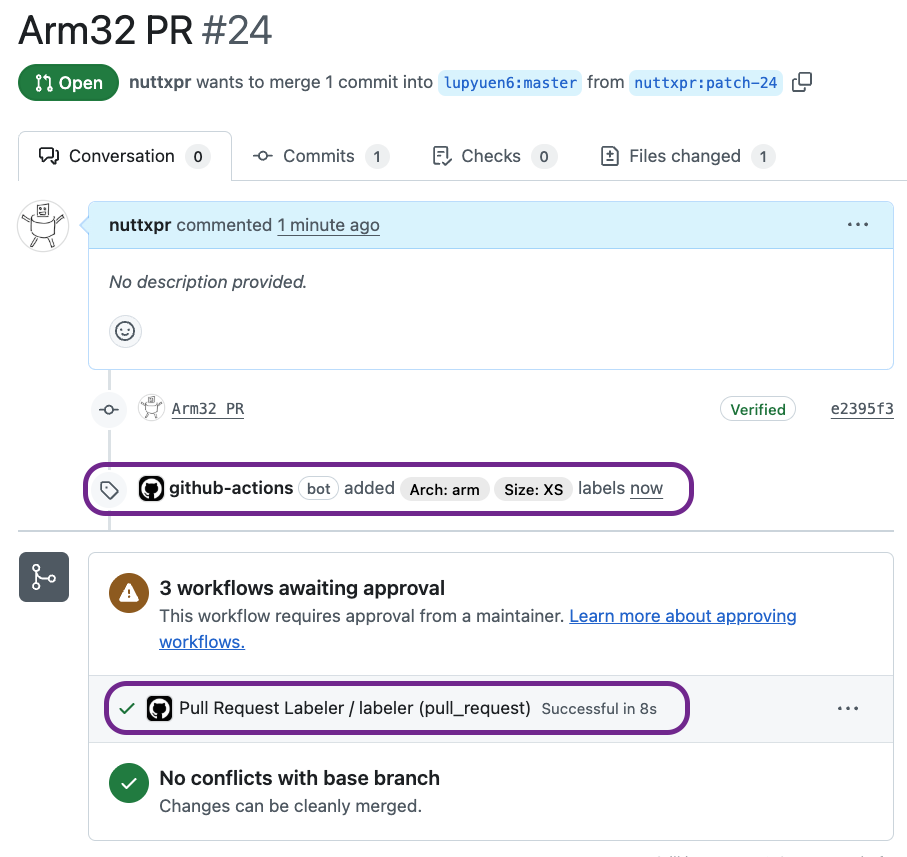
Here are the completed Pull Requests…
Pros and Cons of the new implementation…
New Implementation is Quicker: It’s faster since we don’t checkout the entire repo. Also pr-size-labeler actually runs in a Docker Container, we don’t need that any more.
But it might be quirky under Heavy Load. Remember that workflow_run trigger will write the PR Labels as a Second Job? When we run out of GitHub Runners, the PR Labels might never be applied. The Build Logic in arch.yml will execute a Complete NuttX Build if it can’t find the PR Labels.
Will the Build Workflow be triggered too early, before the workflow_run trigger? Hopefully not. The Build Workflow begins in the Fetch-Source stage, checking out the Entire Repo and uploading everything in 1.5 minutes, followed by the Select-Builds stage (arch.yml) reading the PR Labels. Before 1.5 minutes, rightfully our workflow_run trigger would have written the PR Labels to the PR.
Based on Actual Logs: New PR Labeling completes in 13 elapsed seconds, spanning 2 jobs. Previously: 24 elapsed seconds, in 1 job.
Special Thanks to My Sponsors for supporting my writing. Your support means so much to me 🙏
Got a question, comment or suggestion? Create an Issue or submit a Pull Request here…
What’s an Arch Label?
Arch Labeling looks like arch: arm, arch: risc-v, board: arm, area: Build system, …
One Year Ago: We added PR Labeling to quicken NuttX CI Builds. Depending on the Arch Label, our CI Workflow (arch.yml) will either build One Specific Architecture (like Arm32). Or do a Complete Build across All Architectures.
(Size Label isn’t actually consumed by any of our GitHub Workflows today. We used it for the LLM Bot for PR Review, but we stopped the bot because Gemini upgraded their API and it broke our bot)
How to compute the Arch Labels for a NuttX PR?
We wrote our own GitHub Script (JavaScript) for doing the Arch Labeling (e.g. arch: risc-v).
Arch Labeling (e.g. arch: risc-v) looks straightforward. We just read the rules from .github/labeler.yml and apply them.
Remember to work out all the Test Cases for our new implementation of PR Labeling:
And remember to standby 24 x 7, in case our GitHub Workflow goes haywire and we need to rollback ASAP. (Unless we’re out for Marathon Training)
Inside our New PR Labeler: This is how we read the Labeling Rules from .github/labeler.yml: .github/workflows/labeler.yml
// Parse the Arch Label Patterns in .github/labeler.yml. Condense into:
// "Arch: arm":
// - any-glob-to-any-file: 'arch/arm/**'
// - any-glob-to-any-file: ...
const fs = require('fs');
const config = fs.readFileSync('labeler/.github/labeler.yml', 'utf8')
  .split('\n')             // Split by newline
  .map(s => s.trim())      // Remove leading and trailing spaces
  .filter(s => (s != ''))  // Remove empty lines
  .filter(s => !s.startsWith('#'))                  // Remove comments
  .filter(s => !s.startsWith('- changed-files:'));  // Remove "changed-files"
We transform the Glob Pattern to Regex Pattern, for easier Filename Matching: labeler.yml
// Convert the Arch Label Patterns from config to archLabels.
// archLabels will contain the mappings for Arch Label and Filename Pattern:
// { label: "Arch: arm",   pattern: "arch/arm/.*"   },
// { label: "Arch: arm64", pattern: "arch/arm64/.*" }, ...
var archLabels = [];
var label = "";
for (const c of config) {
  // Get the Arch Label
  if (c.startsWith('"')) {    // "Arch: arm":
    label = c.split('"')[1];  // Arch: arm

  } else if (c.startsWith('- any-glob-to-any-file:')) {  // - any-glob-to-any-file: 'arch/arm/**'
    // Convert the Glob Pattern to Regex Pattern
    const pattern = c.split("'")[1]      // arch/arm/**
      .split('.').join('\\.')            // .  becomes \.
      .split('*').join('[^/]*')          // *  becomes [^/]*
      .split('[^/]*[^/]*').join('.*');   // ** becomes .*
    archLabels.push({
      label,
      pattern: '^' + pattern + '$'       // Match the Line Start and Line End
    });
  } else {
    // We don't support all rules of `actions/labeler`
    throw new Error('.github/labeler.yml should contain only changed-files and any-glob-to-any-file, not: ' + c);
  }
}
This is how we do Regex Matching on the Changed Filenames: labeler.yml
// Search the filenames for matching Arch Labels
for (const archLabel of archLabels) {
  if (prLabels.includes(archLabel.label)) {
    break;
  }
  for (const file of listFilesResponse) {
    const re = new RegExp(archLabel.pattern);
    const match = re.test(file.filename);
    if (match && !prLabels.includes(archLabel.label)) {
      prLabels.push(archLabel.label);
      break;
    }
  }
}
console.log({ prLabels });
Are we reimplementing EVERYTHING from the Official GitHub Labeler actions/labeler?
We won’t implement the Entire GitHub Labeler actions/labeler, just the bare minimum needed for NuttX. We’re emulating the Labeler Config .github/labeler.yml as is, because someday GitHub might invent a Secure Way to Label PRs inside pull_request_target. (Then we’ll switch back to the Official GitHub Labeler actions/labeler)
There’s something really jinxed about the way GitHub designed PR Labeling in pull_request_target, it’s a terrible security hack. This article is the response to that hack :-)
What happens when we change pull_request_target to pull_request? And nothing else?
Nope it doesn’t work! When we changed the trigger from (unsafe) pull_request_target to (safer) pull_request: .github/workflows/labeler.yml
The Labeler Workflow fails, even though our GitHub Token has pull-requests: write and issues: write permissions…
That’s because the Labeler Action runs on a PR from a Forked Repo, which requires pull_request_target…
However, when the action runs on a pull request from a forked repository, GitHub only grants read access tokens for
pull_requestevents, at most. If you encounter anError: HttpError: Resource not accessible by integration, it’s likely due to these permission constraints.
To resolve this issue, you can modify the
on:section of your workflow to usepull_request_targetinstead ofpull_request… This change allows the action to have write access, becausepull_request_targetalters the context of the action and safely grants additional permissions.
And pull_request_target has security concerns…
There exists a potentially dangerous misuse of the
pull_request_targetworkflow trigger that may lead to malicious PR authors (i.e. attackers) being able to obtain repository write permissions or stealing repository secrets.
Hence, it is advisable that
pull_request_targetshould only be used in workflows that are carefully designed to avoid executing untrusted code and to also ensure that workflows usingpull_request_targetlimit access to sensitive resources. Refer to the GitHub token permissions documentation for more details about access levels and event contexts.
(Then why would GitHub allow us to run an Unsafe Labeler? Sigh)